We transmute solutions directly into your HubSpot portal.
Everything beneath your executive questions, answered in days instead of months.
Daeda-powered — your whole database, not a sample
How this works
No scoping call. No iterative design. None of it is needed here — these are plug-and-play solutions that answer the most pressing questions in your HubSpot portal in a matter of days.
- Buy off the shelf
Pick a solution from the library below. Fixed price, fixed scope, no proposal.
- Give us portal access
Your portal is mirrored through Daeda — which is how the work runs against your whole database rather than a sample of it.
- We deploy it
Built in your own portal, in five business days. No status meetings in between.
- You get the deliverables
The build, plus the documents that say what changed, why it stays changed, and what to do next about the things we found along the way that are specific to your business.
The library
- AI Readiness Audit“We need to figure out how to incorporate AI across the business.”$2,750
- Forms Audit & Consolidation“I just need to add a form to this new page.”$1,875
- Subscription & Marketing Status Sync“Why did that brand email go out to so few people — who are we missing?”$4,500
- Lifecycle Conversion Report“I just need a simple lifecycle conversion report.”$2,500
- Channel Causality Analysis“But is that why we ended up winning this deal?”$5,000
Every one is a fixed price and a fixed five business days. Monitoring is available on Channel Causality.
AI Readiness Audit
- How does the AI in question sample your data — because most do not read all of it?
- Which CRM fields does it read and trust as a source of truth that it shouldn't?
- How does it interpret our sales language?
- What assumptions does it make that would lead to harmful financial misinterpretation?
- Do our timestamp fields tell a chronological narrative the AI can trust?
learning through trial by fire when things are obviously wrong, or falling behind on adoption while your competitors aren't.

Or wave the wand.
A clean report that runs your knowledge against the AI's own assumptions — you know the truth, you see how far off it landed, and you get the directions to fix it for true AI adoption.
Preview the output →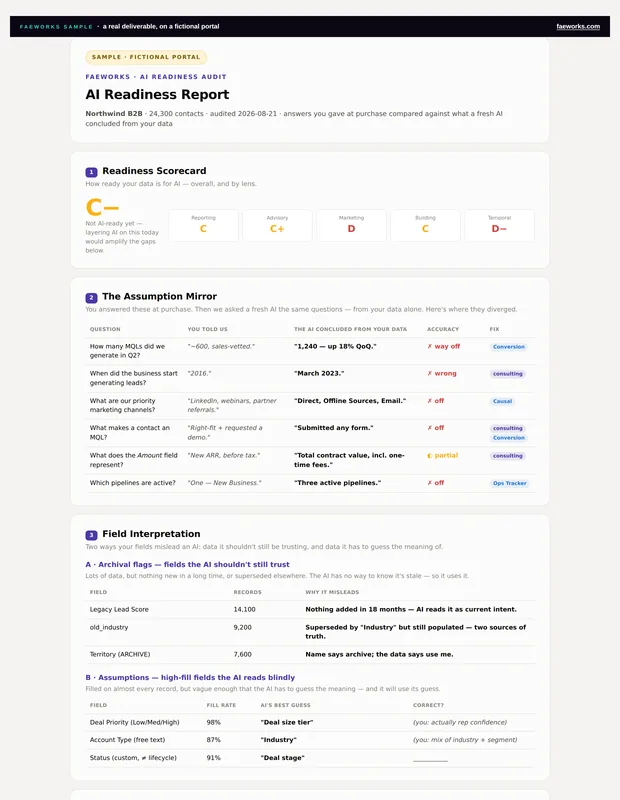
Forms Audit & Consolidation
- Can an existing form work?
- What are the fields — hidden ones too — on all the forms currently live?
- Are these forms used by workflows? Active segments?
- If I use the same form, how will I report on this page's conversion success?
- If I use a new form, how do I make sure it gets routed correctly and the leads get processed?
adding form forty-one and hoping the rest works, or opening a form project nobody has time to scope.
Or wave the wand.
The audit, the mapping for your web team, and the new standard that keeps form sprawl from hurting you in the future.
Preview the output →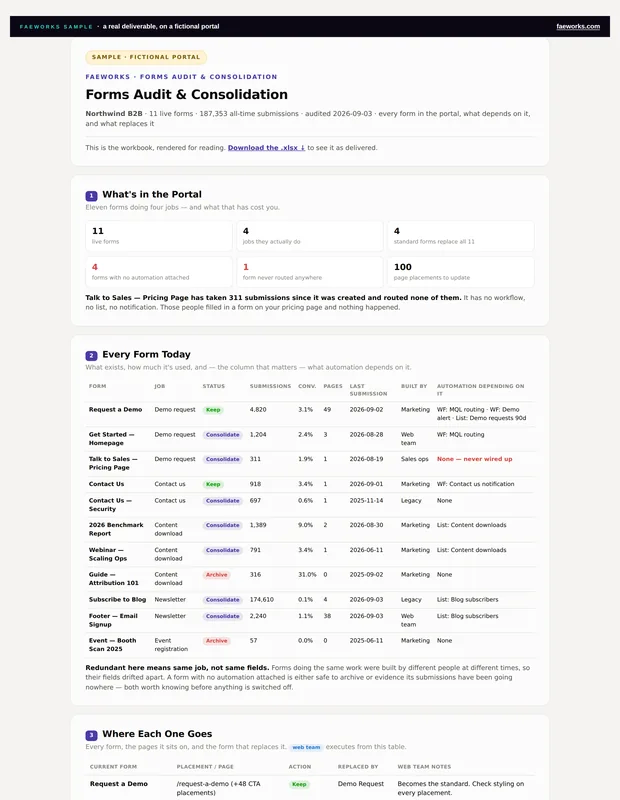
Subscription & Marketing Status Sync
- Which subscription types — not lists — are your sends actually using?
- What portion of your marketing lists is unmailable due to missing subscription types and marketing status?
- What portion of your list size is bad email bloat?
- How much are you paying for in marketing-status contacts that are doing nothing for your marketing initiatives?
another list build with an entirely new number you have to defend, or opening a full subscription management project.
Or wave the wand.
Turning subscription management into an invisible automated process, so these aren't questions you have to hunt down every month.
Preview the output →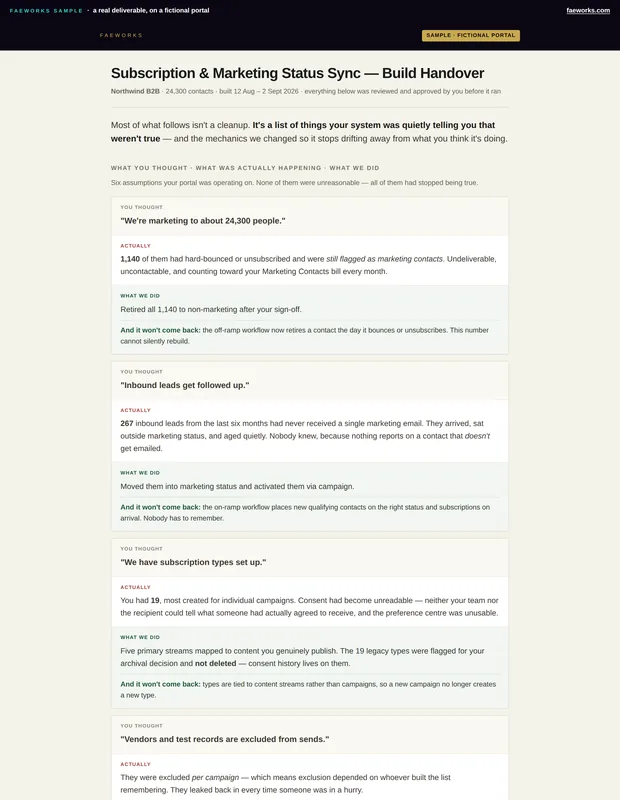
Lifecycle Conversion Report
- Which stages do you count when the pipelines don't match?
- Where is data missing because the team skips deal stages?
- How long does each stage actually take?
- Why did your first attempt produce rates above 100%?
- How do you explain this month's exception, when it isn't the same exception as last month's?
shipping a number you don't fully trust, or spending a fourth week on a "simple report."
Or wave the wand.
Three distinct report groups — velocity, flow and cohort conversion — each carrying the note that says how to read it and what it will not tell you.
Scope: one deal pipeline, every milestone stage in it, built live against your own stage names. Closed Lost is excluded by default — it is an exit, not forward progress. Most portals run more than one pipeline; each additional one is its own build at the same fixed price, and you tell us which at checkout.
Requires HubSpot Professional or Enterprise. The custom report builder and formula fields this is built from are not available below that tier.
Preview the output →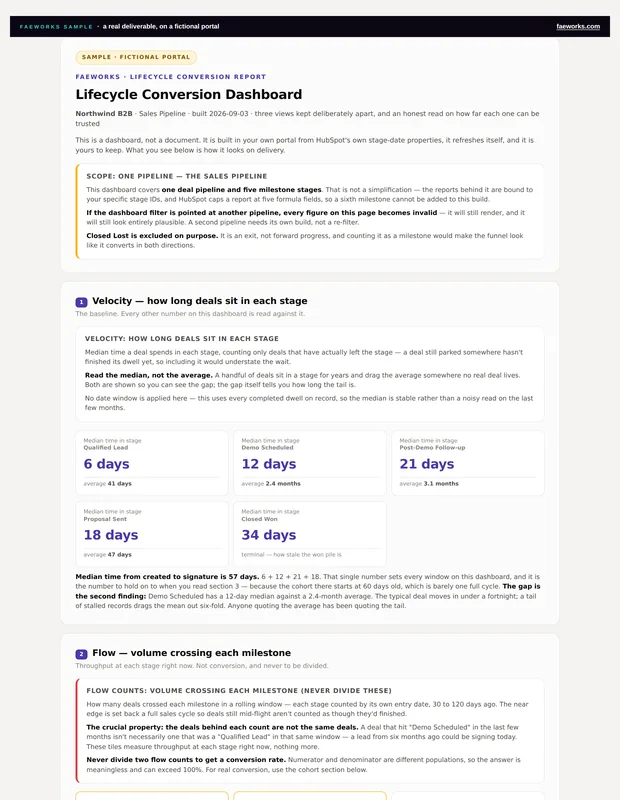
Channel Causality Analysis
- Did that channel cause the win, or was it just the last thing they touched?
- How much of this month is a real change, and how much is your normal variation?
- Do you have enough deals for the answer to mean anything at all?
- Of everything you changed, which actually mattered — and which only happened at the same time?
- And how do you say any of that to the CFO without overstating it?
building a complete attribution model yourself, or setting channel budget on a handful of deals and a feeling.
Or wave the wand.
Which channels moved revenue, which ones only got credit, and how much weight each answer will bear — so when someone asks why you won, you have an answer that survives the follow-up question.
Read across every deal in your portal, not a sample — the Daeda mirror is what makes a claim about causation survive the follow-up question.
One analysis stands on its own. Channel Causality Monitoring keeps it running monthly for $950 — silent in the months when there's nothing real to say. Add it now or after you've read the first report.
Analysis + monthly monitoring — $5,000, then $950/mo Preview the output →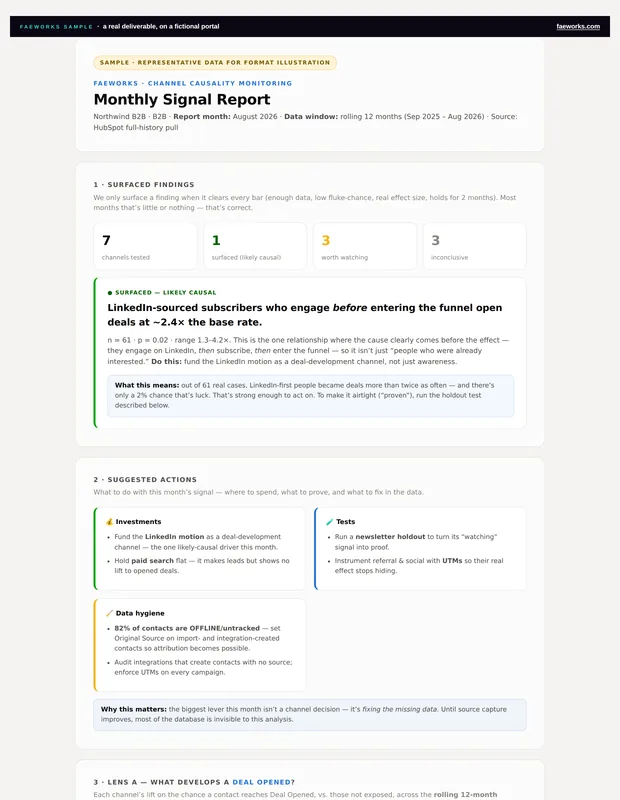
Most of what we repair stays repaired because the mechanics change, not just the data. For the twenty-plus things that degrade in a HubSpot portal without ever raising an error, there's a monitoring program that runs monthly — and for the things no product covers, there's us.
